
Free SEO Tools for Bloggers & Blogspot
5 free SEO tools for bloggers and Blogger/Blogspot users — keyword research, technical audits, and competitor analysis, no credit card needed.
Disclosure: This post may contain affiliate links and display advertising. If you purchase through a link on this page, we may earn a commission at no extra cost to you. See our full disclaimer for details.

I'll show you exactly how I use Blogging to find outdated content, get better insights, and update posts that rank.
Premium SEO suites are powerful, but they often come with steep monthly subscription fees that can be difficult for new bloggers to justify. Fortunately, there is a wealth of free tools available that provide genuinely robust functionality for those willing to look — and use them correctly.
Here are the 5 essential free SEO tools every blogger should be using, including exactly how to set each one up and what to actually do with the data it gives you.

1. Google Search Console (GSC)
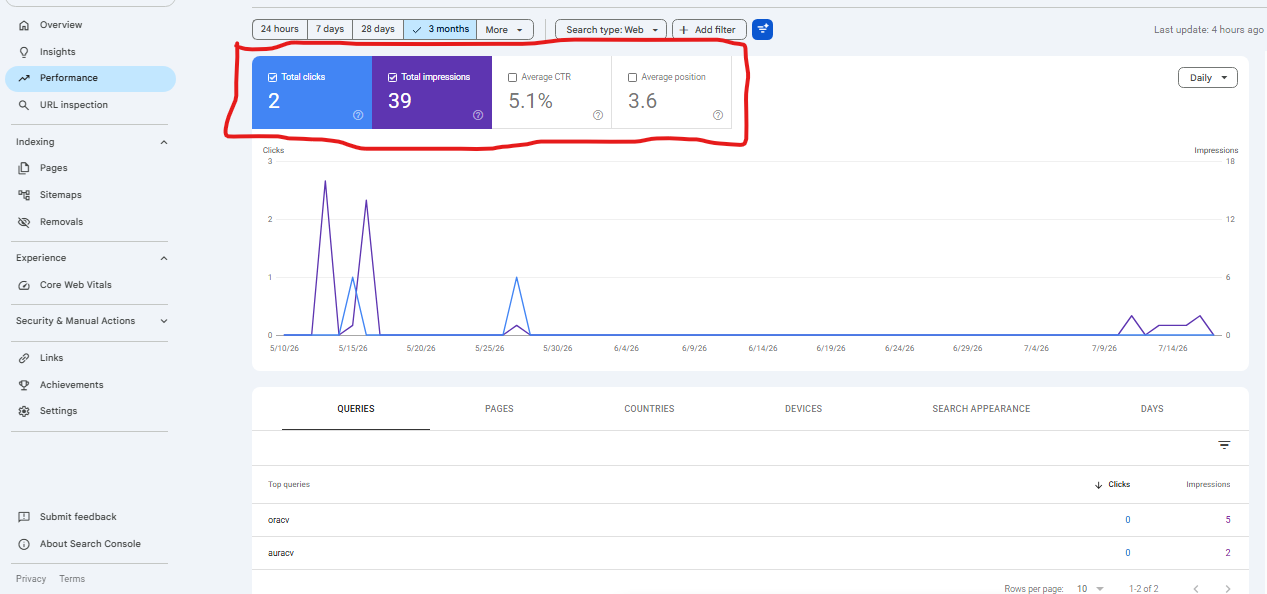
This is unequivocally the most important tool for any website owner, because it's the only tool that shows you data directly from Google itself, rather than an estimate.
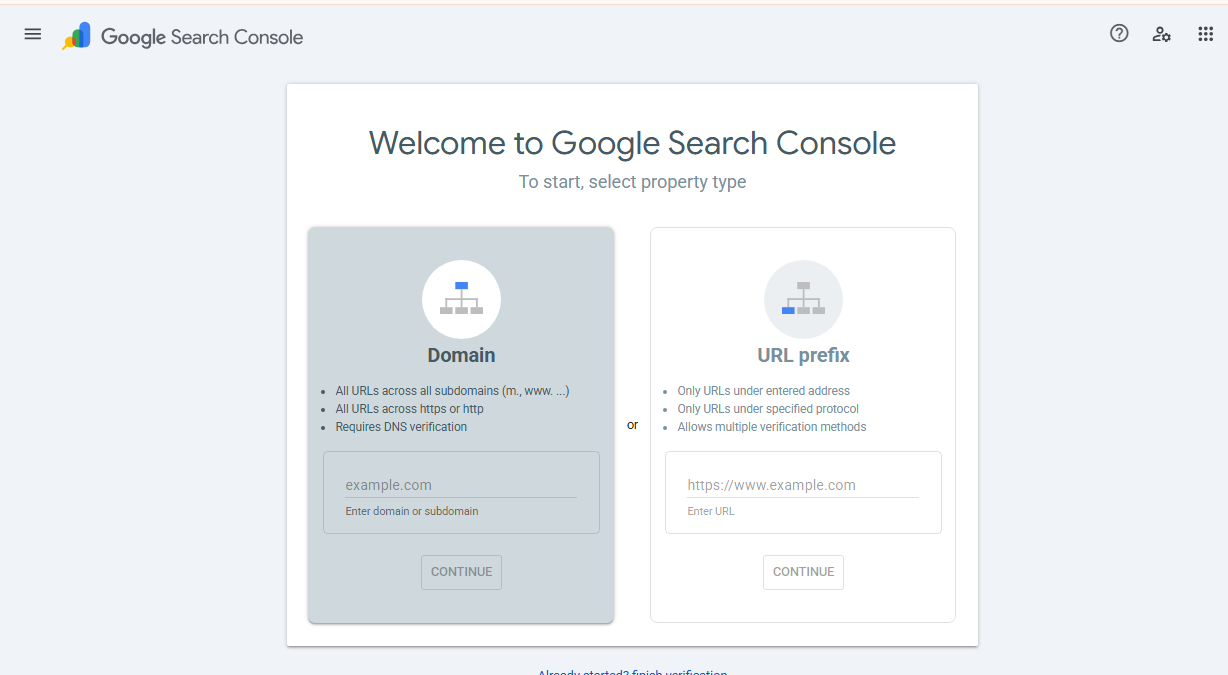
How to set it up: Go to search.google.com/search-console, add your domain as a property, and verify ownership (usually via a DNS TXT record or an HTML file upload). Then submit your sitemap URL under the "Sitemaps" section in the left sidebar.
How to actually use it:
- Check the Coverage/Pages report weekly for indexing errors — a page that "Discovered, not indexed" for weeks usually signals a thin-content or internal-linking problem.
- Sort the Performance report by impressions, then look for pages with high impressions but low clicks. These are pages ranking on page 2-3 for a real query — improving the title and meta description on these is often the fastest win available to you.
- Use URL Inspection and "Request Indexing" immediately after publishing or significantly updating a post, rather than waiting for Google to crawl it naturally.
2. AnswerThePublic (Free Tier)
Understanding what questions your audience is actually asking is crucial for content creation, and it's the fastest way to find long-tail keywords with real search intent behind them.
How to use it: Type in a core keyword related to your niche (e.g., "blog seo"), and the free tier will generate a visual map of the questions, prepositions, comparisons, and alphabetical queries people type into search engines around that term.
How to actually use it: Don't just skim the visualization — export or screenshot the question list and turn the most specific ones directly into H2/H3 subheadings in your post. Question-shaped subheadings are also exactly what gets pulled into Google's "People Also Ask" boxes and AI-generated answer summaries.
3. Ahrefs Webmaster Tools
Ahrefs is a premium powerhouse, but they offer a free Webmaster Tools tier that is unusually generous for a paid company's free offering. Once you verify site ownership, you gain access to real diagnostic features that would otherwise cost hundreds per month.
How to actually use it:
- Run the Site Audit monthly and prioritize "Errors" (broken links, missing titles/meta descriptions, duplicate content) before "Warnings."
- Check the Backlinks report to see who's linking to you — reply to and build relationships with any site that's already linking, since they're your easiest path to a second, stronger link.
- Use Site Explorer's Top Pages report to see which of your posts already attract the most organic traffic, then update those specific posts first when refreshing old content — you're compounding a page that already works, not gambling on a new one.
4. Ubersuggest (Free Chrome Extension)
While the main Ubersuggest app requires a subscription for extended daily use, the free Chrome extension is genuinely handy for quick, in-context research.
How to use it: Install the extension, then simply run a normal Google search for any topic you're considering writing about. Ubersuggest overlays estimated monthly search volume, CPC, and competition data directly next to each result in the SERP.
How to actually use it: Before committing hours to writing a post, search your target keyword and scan the overlay data on the top 10 results. If every result is from a domain with a much higher authority than yours and the term has low volume, it's a signal to pick a more specific long-tail variation instead.
5. PageSpeed Insights
Site speed is a confirmed ranking factor, and it directly affects how many visitors stick around long enough to read what you wrote. PageSpeed Insights analyzes your pages and reports on performance for both mobile and desktop.
How to use it: Go to pagespeed.web.dev, enter your post's URL, and review both the Core Web Vitals scores (LCP, CLS, INP) and the specific "Opportunities" list underneath.
How to actually use it: Don't try to fix everything on the list at once. Start with whatever appears under "Largest Contentful Paint" — it's almost always an oversized hero image — and compress or lazy-load it first. That single change typically has the biggest visible impact on your score.
Putting It All Together: A Simple Weekly Workflow
Having the tools isn't the same as using them consistently. Here's a realistic weekly routine that takes under an hour:
- Monday: Check Google Search Console's Performance report for last week's near-miss pages (high impressions, low clicks) and tweak one title/description.
- Midweek: Use AnswerThePublic to outline your next post's subheadings before you start writing, not after.
- Before publishing: Run the new post's URL through PageSpeed Insights once it's live and fix any obvious image-size issues.
- Monthly: Run an Ahrefs Site Audit and check Ubersuggest search volume for 2-3 upcoming post ideas.
Frequently Asked Questions
Do I really need all 5 tools, or can I start with just one? If you can only start with one, make it Google Search Console — it's free forever, requires no browser extension, and is the only tool on this list that shows Google's actual view of your site rather than a third-party estimate.
How long until I see results from using these tools? Technical fixes found in Search Console or Ahrefs (like fixing a broken sitemap or indexing error) can affect crawling within days. Ranking improvements from better keyword targeting and content depth typically take 4-12 weeks to show up, since Google needs time to re-crawl, re-evaluate, and adjust rankings.
Are free tiers enough, or will I eventually need to pay? For a blog publishing a handful of posts a month, the free tiers covered here are genuinely enough. Paid upgrades mainly become worthwhile once you're tracking rankings for hundreds of keywords or need deeper historical backlink data.
By leveraging these free resources consistently — not just installing them and forgetting about them — you can build a strong SEO foundation and drive significant organic traffic without any financial investment. If you're just getting your blog off the ground, pair this with our beginner's guide to starting a profitable blog for the full picture from setup to first traffic.
About Musab Bin Umair
Expert tech writer and AI enthusiast passionate about exploring the intersection of modern productivity tools and digital growth strategies.
View all posts by Musab Bin Umair →You Might Also Like
View all


Stay Ahead in AI
Get weekly AI tool updates and tech tips delivered to your inbox.